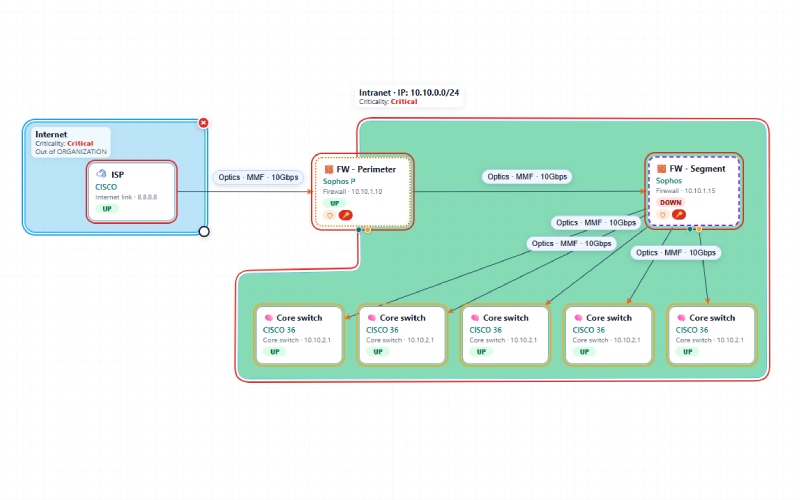

SimBiX: Map, Test and Improve Operational Resilience
SimBiX brings infrastructure mapping, business continuity planning and incident exercises into one web application. Teams can document what their services depend on, rehearse disruptions in a safe simulation and turn the results into practical improvements.
Infrastructure and Operational Maps
Build visual maps of IT infrastructure and operational processes. Add elements, connections, dependencies, zones and groups; mark critical components and link related maps. Explore how a failure could affect connected elements and export maps for documentation.
Technical Asset Documentation
Keep technical details alongside each mapped element, including device information, ports, physical connections, photographs and escalation contacts. Use a library of icons to make maps easier to navigate and maintain.
Business Continuity Management
Maintain a catalogue of critical services, their owners and recovery targets, including RTO, RPO and MTPD. Connect services to the maps they rely on, plan continuity exercises and track lessons learned and corrective actions.
Incident Scenarios
Create tabletop and technical scenarios from reusable templates or build them around a map. Define the reported problem, hidden faults, root cause, expected response, difficulty and time limit.
Exercises and Simulations
Schedule exercises and assign technical tests to participants. During a technical simulation, participants investigate a map through a console that responds according to the scenario. They can diagnose the problem, identify its root cause, arrange response steps and propose a solution. The console simulates the environment; it does not run commands on the live network.
Evaluation and Reporting
Assess responses using scenario-specific scoring for the root cause, response steps and proposed solutions. Review the activity log and results, record an after-action review, export an HTML report and follow up on open actions. A management view connects services with their exercises and latest results.
Discovery and Data Import
Import service data and network information, including CSV and Checkmk XLSX/CSV files. Where active discovery is enabled, scan permitted private network ranges and use the findings to create a preliminary map or enrich existing elements.
Organization and Access Management
Manage organizations, users, roles, map access and licensed modules. SimBiX also supports account approval, email activation, password recovery, optional two-factor authentication, event auditing and Slovak and English interfaces.
From understanding dependencies to practising a response, SimBiX helps teams make continuity plans visible, testable and actionable.